
Recover Lost Files Easily
— No Skills Required
Recover deleted files from your PC, hard drives, USB drives, or SD cards — in 3 simple steps: select, scan, and recover.
Trusted by major tech media
Better Recovery: 1/2 the Price.
Get the same recovery results at half the cost.
Supports 2000+ Storage Devices
Recover data from internal and external drives — including hard drives, USB drives, and memory cards — quickly and safely.
Laptop
Win / Mac / Linux
Desktop
PC / Workstation
USB Drive
USB flash drive
Memory Card
SD / CF / MicroSD
MP3 / MP4 Player
MP3 / MP4 / iPod
Hard Drive
HDD / SSD / RAID
External Drive
External HDD / SSD
Digital Camera
DSLR / Action camera
Supports 1000+ File Types
From everyday documents to professional RAW camera files, we support almost all file types you use every day.
Photos & Images
JPG, PNG, RAW, PSD, CR2, NEF, ORF, SR2, BMP, GIF, TIFF, DNG, RAF, ERF, ICO, etc.
Videos
AVI, MOV, MP4, M4V, 3GP, 3G2, WMV, ASF, FLV, SWF, MPG, RM/RMVB, MKV, MXF, etc.
Music & Audio
AIF/AIFF, M4A, MP3, WAV, WMA, MID/MIDI, OGG, AAC, ALAC, FLAC, APE, DSD, etc.
Documents
DOC/DOCX, XLS/XLSX, PPT/PPTX, PDF, CWK, HTML/HTM, INDD, EPS, TXT, RTF, CSV, etc.
Emails & Web Data
PST, DBX, EMLX, EML, MSG, OFT, OST, VCF, MBOX, HTML, PHP, ASPX, etc.
Archives & Other Files
ZIP, RAR, SIT, 7Z, ISO, EXE, SITX, DMG, BZ2, JAR, WAR, CAB, TAR, etc.
From any situation
recover data
Whether you accidentally deleted files, emptied the recycle bin, or your system crashed, no matter what happened, you can get your data back quickly and safely
- Recover accidentally deleted data
- Recover data from formatted drives
- Recover lost partitions
Deleted Files
Recover files that were completely deleted from the emptied recycle bin or via Shift+Delete.
Formatted Drive
Recover data from formatted HDD, SSD, USB, and SD cards
System Crash
Boot a non-booting PC and rescue files from internal storage.
Damaged Partition
Fix RAW drive errors and recover from lost partitions.
Virus Attack
Recover files hidden or damaged by malware infection.
External Media
Supports external devices like cameras, drones, and media players
Why Choose RitriData
Preview before recovery
Scan and preview your files for free — recover up to 3 files for free.
Advanced Deep Scan Technology
Recovers deeply hidden and fragmented files that basic tools miss
100% Safe — Read-Only Recovery
RitriData operates in 'read-only' mode. Zero risk of overwriting or damaging your original data. Your data stays private and secure.
Recover Data in 3 Simple Steps
No complicated setup — just select, scan, and recover
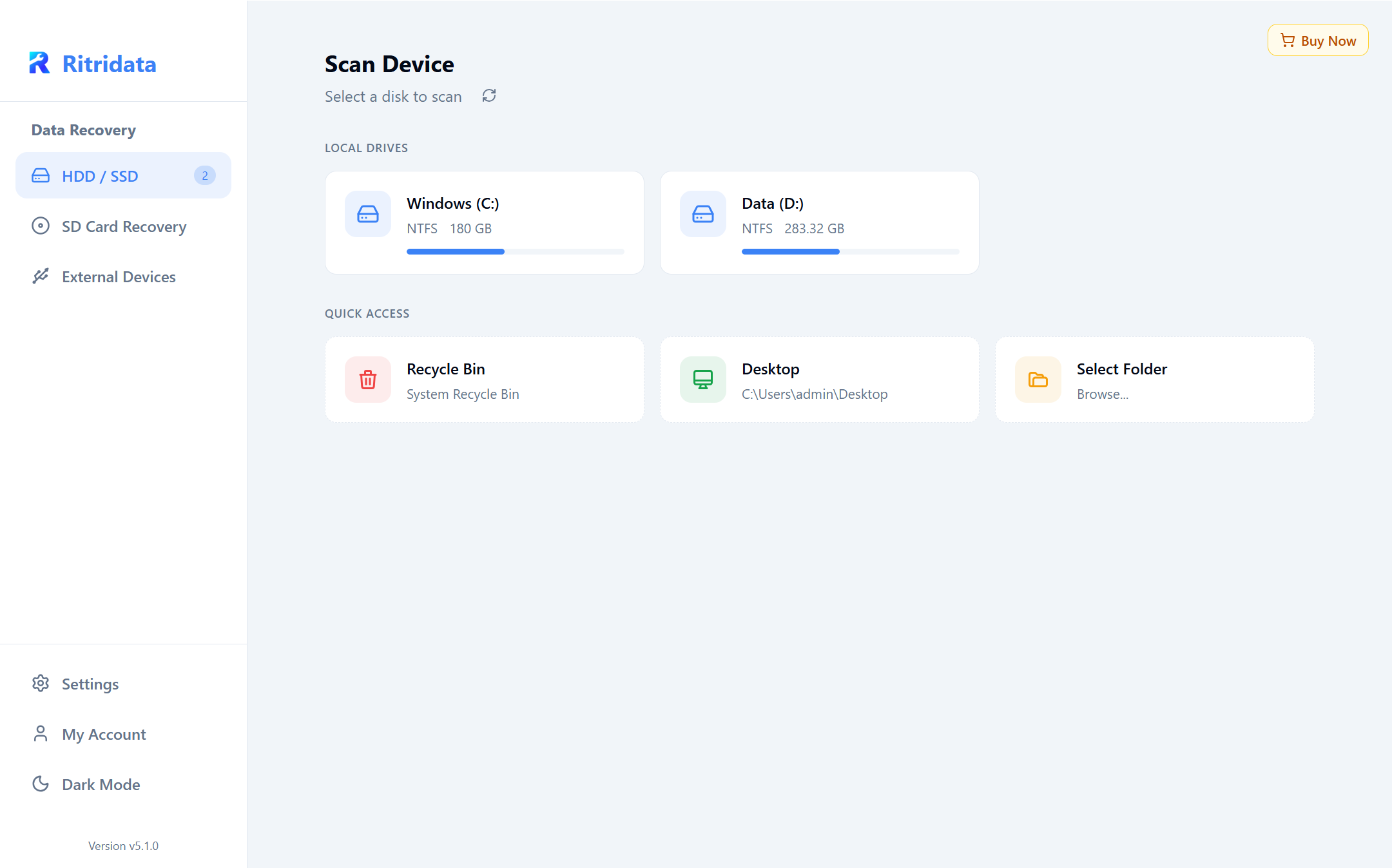
Choose a Location
Select the drive where your data was lost. We support local drives, external USB, and even specific folders like the recycle bin.
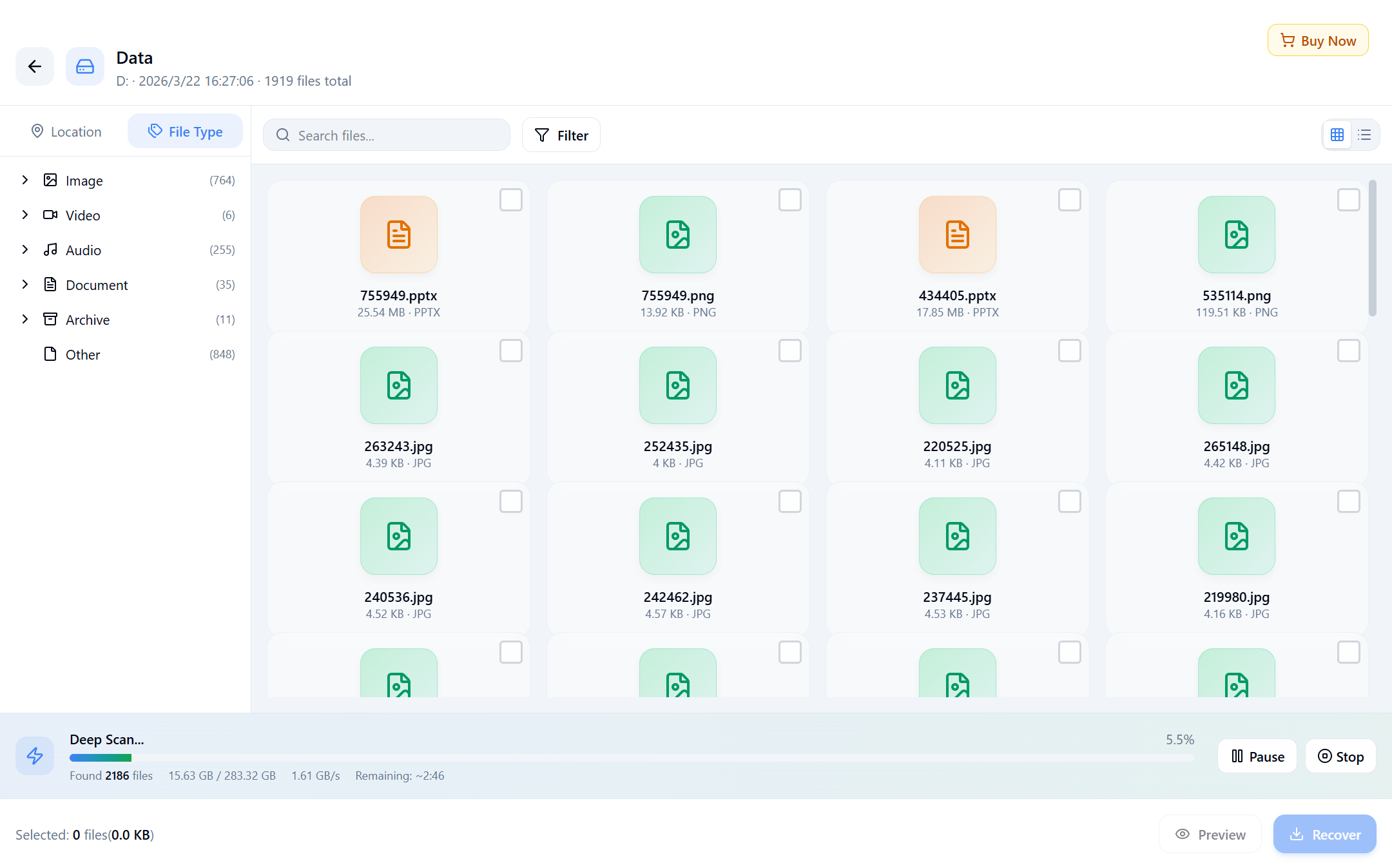
Scan and Preview
Scan your drive and see recoverable files in real time — preview them before you recover.
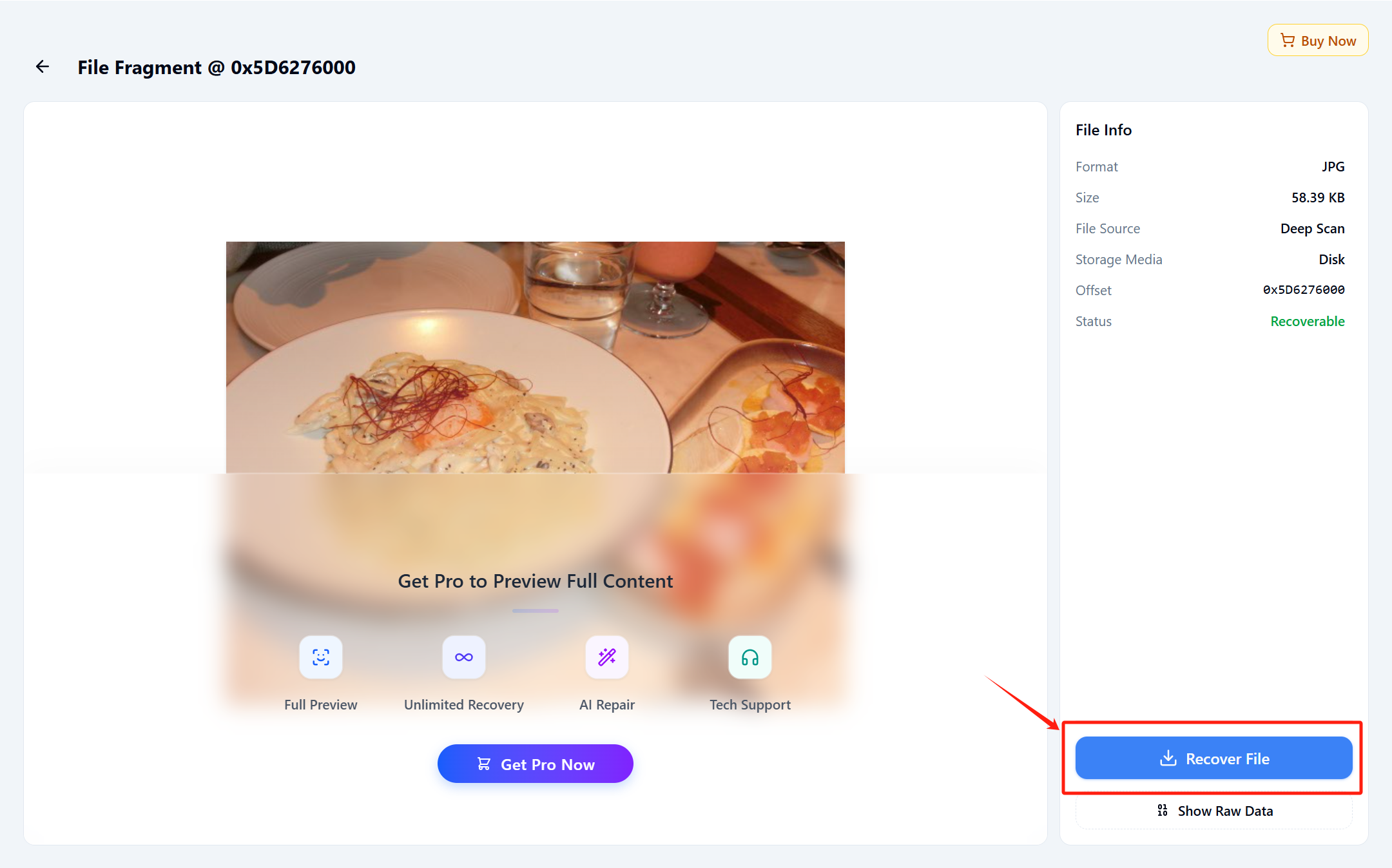
Recover Now
Select the files you want to recover, click the 'Recover' button, and save them to a safe location.
Chosen bymany users
"Photos I had given up on came back"
My SD card just stopped working, and I thought everything was gone. I tried a few other tools, but they couldn’t find anything — RitriData got everything back in the end.
"Slow Scan, But Fully Recovered"
The scan took a few hours on my 2TB external drive (around 5), which was a bit longer than I expected. Still, it managed to recover all my missing Excel files, so I can’t really complain.
"Even a PC novice like me could use it"
I’m not very tech-savvy and almost went to a repair service, but the cost was too high. I gave this a try and was able to get my files back just by following the on-screen steps. Being able to preview everything before paying was really helpful.
* These are individual opinions and do not guarantee recovery in all environments.
Scan for Free — See What You Can Recover
Scan and preview your files for free — no payment required
7-Day Money-Back Guarantee · Secure Payment · 24/7 Support